Tech-ed 2009 update: BPOS rocks!
If you are attending tech-ed, make sure you get your Business Productivity Online Suite (BPOS) account setup.. I have been most impressed by BPOS.
What's BPOS? click here
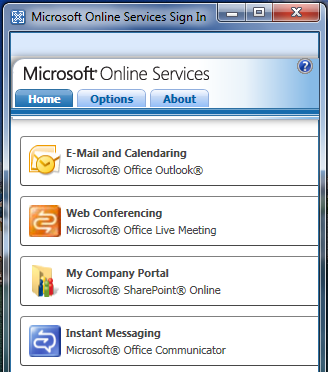
If you are attending tech-ed, make sure you get your Business Productivity Online Suite (BPOS) account setup.. I have been most impressed by BPOS.
What's BPOS? click here
So you’ve arrived in the Gold Coast, checked in, unpacked, visited the gym and checked out the pool (right?) now what? I was planning which sessions to attend over the next few days and thought it would be a good idea write a post about it.
Firstly, I would definitely recommend that you get to registration as soon as possible to avoid the rush! Registration will be open until 9pm tonight and then again from 7am tomorrow morning. Once registered you can also pick up your HP Mini Notebook (of course I am writing this post on it!), there is an “unpacking area” in the convention centre if you would like to dispose of the box and packaging.
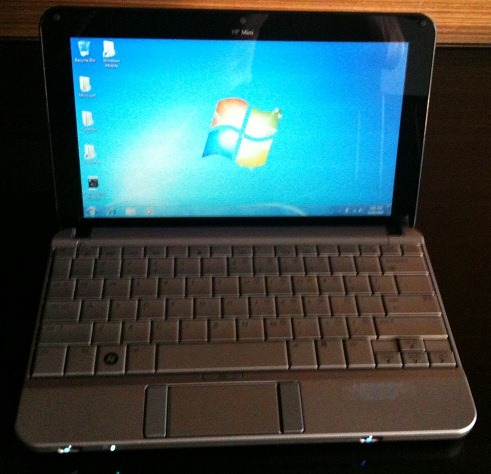
There is a welcome reception at the exhibition hall betweenn 6pm and 9pm and the opening keynote is tomorrow at 08:15am. All this info is in the mini-guide.
As far as sessions go, here are some of the ones I am looking forward to attending:
Wednesday:
09:45am – 11:00am UNC201 - Introduction to Exchange 2010 with Johann Kruse and Roger Lawrence
11:30am – 12:45pm UNC302 - Exchange 2010 Architecture with Scott Schnoll
Thursday:
08:15am – 09:30am UNC305 - Exchange 2010 Voicemail with Mario D'Silva
5:00pm – 6:15pm UNC309 - OCS 2007 R2: Overview & Architecture with Derrick Buckley and Craig Pringle
Friday:
08:15am – 09:30am SEC310 - IAG... the success story with Jean-Pierre Simonis
11:30am – 12:45pm – UNC311 - Telephony in OCS R2 with Brendan Carius and John Smith
There are of course other events going on, one of which is Sydney UC and Melbourne OCS User Group get together on Thursday. click here for more info
Cant make it to tech-ed this year? no need for tears… many sessions are available on live meeting, click here for more info
and finally, yes, of course I will be tweeting all week! be sure to follow me on twitter!
Jetstress has been updated to support Exchange 2010. The beta build is now available. There are a few significant changes in this version, for a comprehensive list, see the following post on The Exchange Server Team blog.
To download Jetstress 2010 Beta, click here
Microsoft recently announced the release of Exchange 2007 SP2. One of the key and long awaited features of SP2 is that it sets the foundation for the transition to Exchange Server 2010, which is expected to be available soon. Other features include:
For more detailed information, see the release announcement on The Microsoft Exchange Team Blog. To download it, click here
I recently came across a very interesting problem while configuring ISA 2006 logging to a remote SQL server. If you have ever done this, you’ll no doubt know that its not a very complicated thing to do –in fact, Richard Hicks has a great guide on his blog, here. It really surprised me when I was not able to get it working, I’ve done it many times before and I have never had any problems.
I checked connectivity to my SQL server using telnet and the "Test” button when performing the configuration, everything seemed fine, but no data was appearing in the database
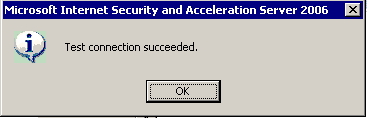
On the SQL server, a temp table was being created, no rows inserted and the stored proc to copy the rows from the temp table to the permanent one never got called. The session appeared to wait with "async_network_io"
After speaking to Microsoft and performing a ISA trace, it appeared that there is some buffer issue (insufficient buffer) when ISA is trying to insert the log record to the SQL server. It looked like the problem happened before writing to SQL. This also explained why there was no row inserted into the temp table, and the SP to move the record from temp table to permanent one had never been called.
It turns out that the string format call which generates an EXEC SP statement to insert log records only has a buffer of 100 characters and the combination of my server name and table name exceeded this. Shortening the table name fixed the problem.
In Microsoft ISA Server, alerts can be configured to shut down the Microsoft Firewall service when situations that raise specific events occur. Whenever the Firewall service shuts down, ISA Server goes into lockdown mode, in which only specific types of traffic are allowed. ISA Server can leave lockdown mode only when the Firewall service is restarted. By default, the built-in Log failure alert shuts down the Firewall service. This alert is triggered by the Log failure event, which is raised when a logging failure occurs. You can prevent logging failures from causing ISA Server to go into lockdown by disabling the action of the Log failure alert that shuts down the Firewall service.
Microsoft have documented this on Microsoft Technet, although this solution is documented for ISA 2004, it seems to work just fine for ISA 2006. The only problem I encountered is that the script on Technet seems to have be “text wrapped” so it comes up with syntax errors.
***WARNING***
I am not in any way suggesting that this script should be run on your ISA servers. Lockdown mode is not a bug and was included in the product by design, there are many reasons why it is a good thing so my advice is that you consider all options very carefully before running this script. ALWAYS backup your configuration first!!
I have corrected the syntax errors, DisableLockdownOnLogFailure.vbs can be downloaded here
I came across this error for the first time the other day, not entirely sure why I have not seen it before on Win 2008. This particular server was Windows 2008 Ent with SP2.
“Setup failed due to insufficient permissions….”
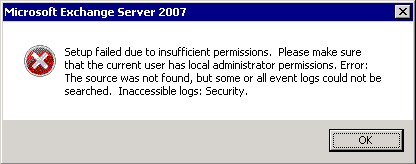
At first I thought it was pretty obvious that my account did not have the correct permissions, right? that's what the error suggests.. checked AD and it turns out I had been granted the correct permissions. What else could it be? As a test, I tried to open the Security Log and that worked.. I was a little confused. Then I realised what it was.. UAC
User Account Control (UAC) is a technology and security infrastructure introduced with Microsoft's Windows Vista operating system. It aims to improve the security of Microsoft Windows by limiting application software to standard user privileges until an administrator authorizes an increase in privilege level. In this way, only applications that the user trusts receive higher privileges, and malware should be kept from receiving the privileges necessary to compromise the operating system. In other words, a user account may have administrator privileges assigned to it, but applications that the user runs do not also have those privileges unless they are approved beforehand or the user explicitly authorizes it to have higher privileges. Windows 2008 also uses UAC.
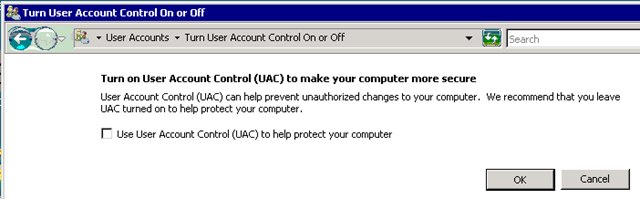
The workaround I used was to turn off UAC and reboot the server, setup worked perfectly after that.
To turn off UAC, go to “Control Panel”, then “User Accounts”.
Microsoft have released Update Rollup 9 for Exchange 2007 SP1. This rollup includes included many bug fixes, but also enables support for Windows Server 2008 R2 Domain Controllers in the environment. For a full list of the issues that the update rollup fixes, click here
Update Rollup 9 for Exchange Server 2007 SP1 is a cumulative update. This update replaces rollups 1 – 8.
To download and for more information, click here
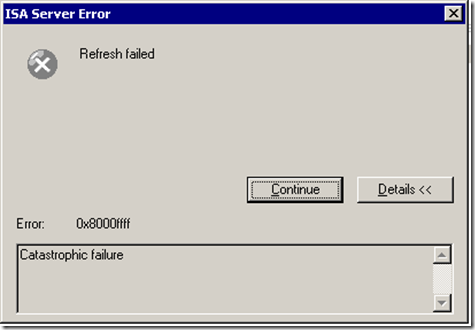
After a long day of troubleshooting ISA 2006 array problems, I must say, I felt like one after I saw this error:
There has been a serious lack of original content on my blog this month, with the financial year coming to an end here in Australia, I’ve been flat out
Never fear though, Scott Schnoll over at The Microsoft Exchange Team Blog has put together a great 4 part video series on high availability in Exchange Server 2010:
In Part 1 he introduces the concept of database mobility, and the features known as database availability groups (DAGs) and mailbox database copies.
In Part 2 he demonstrates how to create a DAG and how to add mailbox servers to a DAG
In Part 3 he shows how to add a mailbox database copy
and, in Part 4 he performs a database switchover using the Exchange Management Console (EMC)