Exchange Server 2010 Deployment Assistant

Now that Exchange 2010 has been officially launched and made available, I’m sure many organisations are already thinking about or planning their deployment. I my opinion, this will be especially true for those who still have Exchange 2003 deployed.

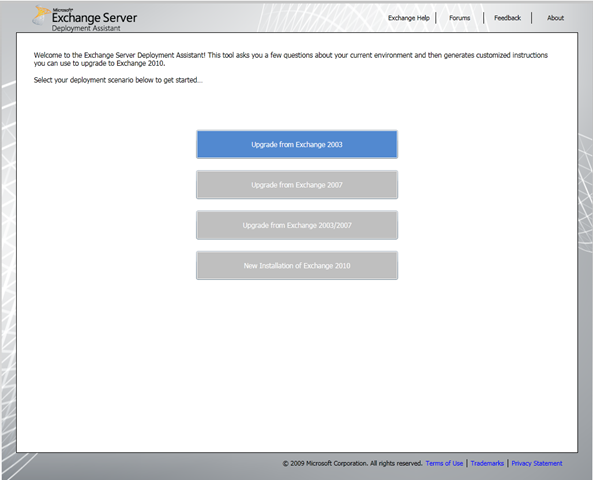
Microsoft have once again stepped up and just when you thought they’ve outdone themselves, they announce the release of the Exchange Server 2010 Deployment Assistant. This awesome tool is a result of feedback from the early adopters of Exchange 2010 and of course Microsoft wanting to help streamline the experience of deploying Exchange 2010.

image

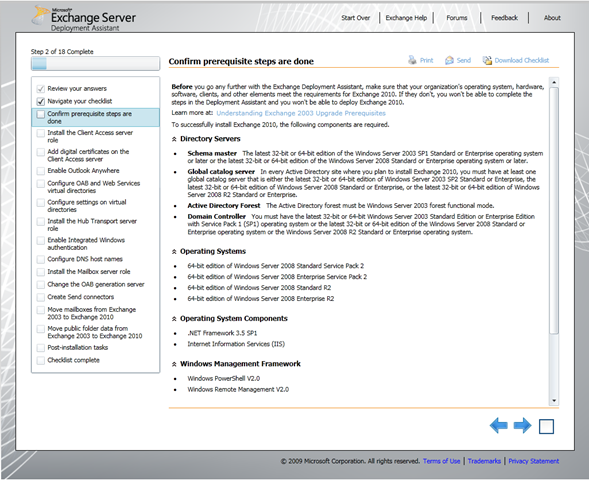
The current version offers the Upgrade from Exchange 2003 scenario.Once the deployment scenario is selected, you are taken through a series of questions and then presented with a list of steps to complete. Each step has a huge amount of valuable information to guide you through your deployment.

image

Additional scenarios will be available in early 2010, these include:

  • Upgrade from Exchange 2007
  • Upgrade from Exchange 2003/2007
  • New installation of Exchange 2010

The Exchange Server 2010 Deployment Assistant can be found here

Exchange 2007 on Windows 2008 R2

Kevin Allison, GM Exchange Customer Experience announced on the Exchange Team blog yesterday that Microsoft will be releasing an update for Exchange 2007 enabling full support of Windows Server 2008 R2.

Microsoft had earlier decided not to update Exchange 2007 to support its latest server operating system, Windows Server 2008 R2. This change is a result of customer feedback, so all I can say about it is thanks for listening!

DAG’s supported in the Exchange 2010 Standard edition

Microsoft have announced that the new high availability feature of Exchange 2010, namely, Database Availability Group, or DAG will be available in Exchange Standard edition. This is yet another great way they are helping make high availability affordable and appealing to smaller customers.

It is also worth mentioning though that since a DAG makes use of Windows Failover Clustering (WFC) included with Windows Server 2008 Enterprise edition, this Windows Server edition is still required.

For more info see this UC Blog post

For more info on DAG’s, click here

Microsoft Virtualization Best Practices for Exchange Server

Microsoft have got a webcast coming up next week to discuss recommendations for virtualizing Exchange server and the benefits of using Hyper-V + System Center for virtualization.

The webcast is on Wednesday, Nov. 4 at 10am Pacific time, which is Thursday, Nov 5 at 5am for those in Sydney.

For more information and to register for the webcast, click here

Exchange Remote Connectivity Analyzer has been updated!

The Exchange Team have released an updated version of the Exchange Remote Connectivity Analyzer

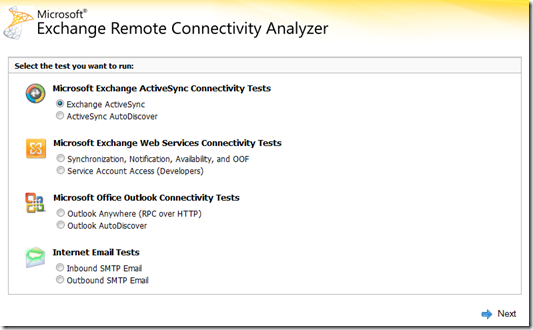
The tool simulates several client logon and mail flow scenarios. When a test fails, many of the errors have troubleshooting tips to assist you in correcting the problem. You may recall reading about it before..

Some new features include:

  • Updated user interface
  • New CAPTCHA implementation
  • Updated the Outlook Anywhere test logic to work with Exchange 2010
  • Added a password confirmation text box to ensure the proper password was entered before running a test. This will reduce the number of tests that fail simply due to a typo in the password.


Additional tests include:

  • Exchange Web Services - This allows you to perform connectivity testing for Exchange Web Services client such as Entourage. Developers can also use the Service Account Verification test to ensure things are configured and working properly for access with an alternate account or Exchange Impersonation.
  • Outbound SMTP - Performs Reverse DNS testing, DNS RBL Checks, and SenderID validation against a provided "outbound" IP address


image

Climate Change..

That’s right, you have not misread the heading.. not the kind of thing you would expect to see on here, right?.. Before you ask, I have not lost my mind, well.. not entirely.. today is Blog Action Day '09 and this year’s topic is Climate Change so I thought I would try to talk about that a little. I’ll be the first to admit that I am no expert on the subject, I don’t drive a Prius and I don’t always remember to take my own shopping bags when I go shopping.

We've all seen the lists right? “25 Ways to Help Curb Climate Change”, etc.. etc and these usually contain things like “Recycle your newspaper” and “Take the bus as often as possible”. Firstly, who still reads the newspaper? we geeks are all about RSS feeds and Kindle’s anyway and if you live in a city, chances are you already take the bus daily.. don’t get me wrong, I think these little tips are important, but, I think its time some of these get revised.

I am a great believer that technological innovation will contribute significantly to reducing the effects of climate change. Other factors, like population growth on the other hand is often overlooked in this debate. Continuous population growth and an expected increase of 2.3 billion people on the planet by 2050 is multiplying the impacts of climate change. Perhaps greater access to family planning is the key? in fact, according to a London School Of Economics study, money spent on contraception is five times more efficient than money spent on clean energy technologies.

Lets look at little ways technology can help. LCD monitors.. not only do they look cooler and take up less room on your desk, they use less than half the power of a traditional CRT.

One of my personal favourites is Blackle. “Blackle was created by Heap Media to remind us all of the need to take small steps in our everyday lives to save energy. Blackle searches are powered by Google Custom Search”. But why? here’s why.. An all white web page uses about 74 watts to display, while an all black page uses only 59 watts. lets do a little math and see what could be saved by moving a high volume site to the black format.

Google gets about 200 million queries a day. Let's assume each query is displayed for about 10 seconds; that means Google is running for about 550,000 hours every day on some desktop. Assuming that users run Google in full screen mode on a CRT monitor, the shift to a black background will save a total of 15 (74-59) watts. That turns into a global savings of 8 300 kilowatt-hours per day, or about 3 000 000 kilowatt-hours a year. Now take into account that about 25 percent of the monitors in the world are CRTs, and at 10 cents a kilowatt-hour, that's $75,000.

If you are reading this off my actual blog (not via RSS) you are probably looking around right about now and thinking something along the lines of “this site is not black!” well, yeah.. and I don't get 200 million hits a day either, if i did, it would probably be black.. black is the new white after all.

Other links:
How to determine your AD and Exchange Schema version

I was looking for a good reference of AD and Exchange schema version numbers yesterday and thought it would be handy to combine all the bits of information I came across into a single post.

There are a couple of ways to find the schema version number, I prefer using “DSQuery” to “ADSIEdit” so I’ll be making use of “DSQuery” in the following examples.

To determine the version of your AD schema, we use “DSQuery” to find the value of the “objectVersion” attribute:

dsquery * cn=schema,cn=configuration,dc=yourdomain,dc=local -scope base –attr objectVersion

Here is a mapping between the “objectVersion” attribute value and the AD schema version:


Value
Schema Version
   
13
Windows 2000 Server
30
Windows Server 2003 RTM/SP1/SP2
31
Windows Server 2003 R2
44
Windows Server 2008 RTM

To determine the version of your Exchange schema, we use “DSQuery” to find the value of the “rangeUpper” attribute:

dsquery * CN=ms-Exch-Schema-Version-Pt,cn=schema,cn=configuration,dc=yourdomain,dc=local -scope base –attr rangeUpper

Here is a mapping between the “rangeUpper” attribute value and the Exchange schema version:


Value
Schema Version
   
4397
Exchange Server 2000 RTM
4406
Exchange Server 2000 SP3
6870
Exchange Server 2003 RTM
6936
Exchange Server 2003 SP3
10628
Exchange Server 2007 RTM
11116
Exchange Server 2007 SP1
14622
Exchange Server 2007 SP2
 

NOTE: in both examples, it is assumed that your domain name is “youdomain.local”

"TechEd Australia Should be a Full Week"

Having attended Tech-ed Australia last week, I cant help but echo my friend and colleague Craig's thoughts. Infact, I thought I would repost something from his blog. The original post can be viewed here

Last week I attended TechEd Australia in the Gold Coast.  I had a great time learning, connecting, talking, networking, teaching, socialising and presenting.  Having said that I left the Gold Coast both drained and a bit frustrated.

While there was a lot of content there, there was an awful lot of content that was not there.  I was lucky to be one of the speakers in the UC track.  There were 12 sessions allocated for the UC track.  Nine were focused on Exchange 2010 and three went to OCS 2007 R2.  Now, granted, Exchange is a flagship product and 2010 is an exciting release.  I would not take anything away from Exchange.  But OCS 2007 R2 needed much more coverage.  Rewind a year to TechEd 2007 and all the OCS 2007 R2 content was still under embargo so the result of the lack of sessions at TechEd 2009 is that R2 content has not really had a good airing at a large public conference in Australia.

This is not due to a lack of speakers – I submitted two other sessions that did not make the cut.  I know other external speakers who put sessions forward that did not get a slot at all.  I know the Microsoft UC guys could of done more sessions.  Nor is it due to a lack of things to talk about.  In pulling together content for our overview session Derrick Buckley and I drew content and inspiration from no fewer that 5 TechEd US sessions!  Oh the detail we could of gone into if we had had the time.  Edge Services, Conferencing Solutions, Group Chat Architecture and UC Applications could all easily be sessions in their own right.

So if we need more room in the UC track (among others) and we can’t trim back on the existing content because we need that too, what’s the solution.  Simple really.  TechEd Australia should be five days long, like the one in the US is.

Now, I know that events cost money and extending TechEd Australia to five days would not come cheap – but there must be a way.  One suggestion I would put forward would be to combine TechEd Australia and TechEd  New Zealand into one ANZ event.  Surely it would be cheaper to run one event for 4000-5000 people than two for 2500 each.  Also with fewer flights and nights of accommodation for the US speakers that hit Australia and New Zealand perhaps we could get more US speakers out here for the same money?  More days, more colleagues, more experts and more content.  It sounds like a winner to me.

Now – in reality this would probably mean canning TechEd NZ and just having one in Australia since there are no venues in NZ big enough to host an event that size.  I use to live in NZ and I would of crossed the Tasman to attend TechEd in Australia if need be, but I’m sure there will be plenty of naysayers.  Even now, if NZ builds a venue I would happily cross the ditch in the other direction to attend an ANZ TechEd in New Zealand.

I tweeted this thought the other day and got a few comments back from people who thought two more days would be great if their livers could hold out.  What say you Microsoft?

Tech-ed 2009 update: Forefront TMG

Today I attended the SEC208 session with Jamie Sharp which really provided a great overview of Microsoft Forefront Threat Management Gateway (TMG). If you use and like ISA server, you’ll love TMG.

Some of the great new things we can look forward to are web filtering, URL filtering and it also has built in Exchange Edge Server functionality which means if you have an Exchange Edge Server role deployed and also use ISA server, you can now consolidate these into a single server. Another cool thing is, like Exchange Server 2010, TMG will only be available in 64bit.

TMG is currently available as beta3, click here to download it. It is expected to be RTM towards the end of the year.