Microsoft Online Services Internet Connection Performance Test

This handy little tool has been around for some time now but I’ve found that it does not seem to be very well known so I thought I would write up a quick post.

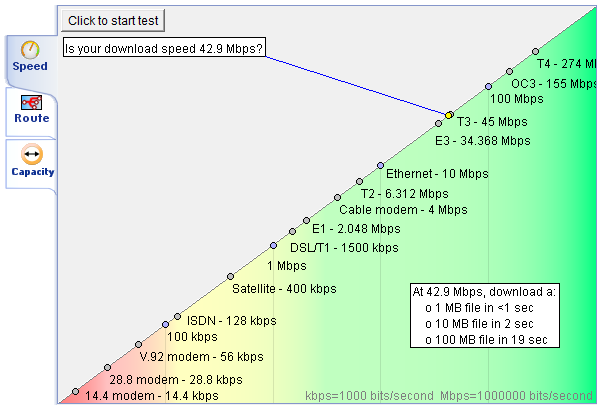
This performance tool tests your Internet connection to a Microsoft Online Services data center and measures the response times, bandwidth, and overall connection quality. The results can help you evaluate your network configuration for potential use with Microsoft Online Services.

image

For America use http://speedtest.microsoftonline.com

For Asia Pacific use http://speedtest.apac.microsoftonline.com

For Europe, Middle East and Africa use http://speedtest.emea.microsoftonline.com

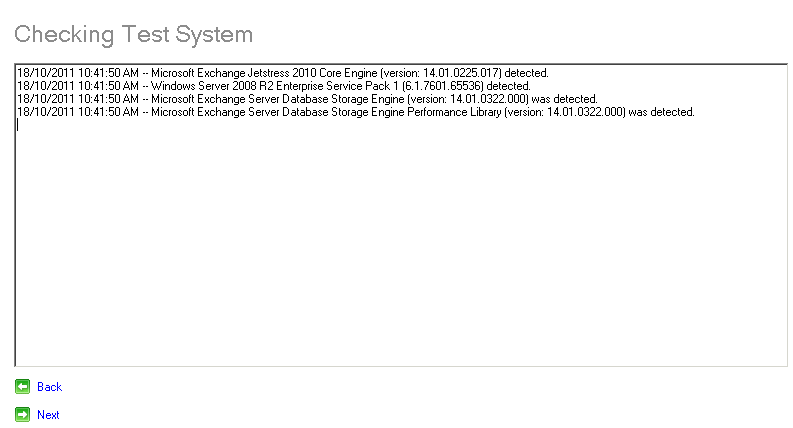
Jetstress Error: The MSExchange Database or MSExchange Database ==> Instrances performance counter category isn't registered

I recently came across this error while using Jetstress to test and validate the performance of their Exchange storage. I was running the tool on Windows Server 2008 R2 and I don’t recall ever seeing this before. After finding what is actually an easy fix, I thought I would  write up this post just in case this has anyone else baffled. The entire error was:

Ensure that you’re running the application as a member of built-in Administrators security group.

The MSExchange Database or MSExchange Database ==> Instrances performance counter category isn't registered.
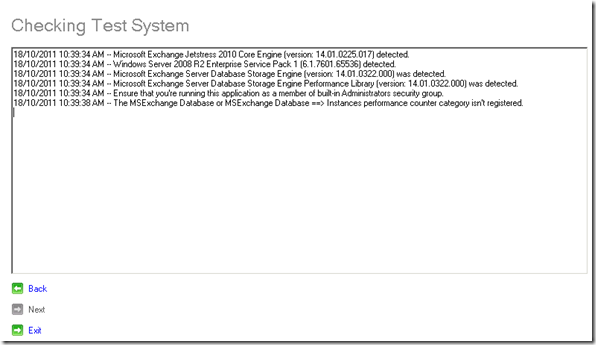
jetstress1

The admin account I was using is a member of the domain admins security group so I assumed I had the correct permissions but went away and checked just to be sure. I also checked to make sure that the domain admins group was a member of the local built-in Administrators security group, which it was. After spending a few minutes thinking about it, I thought I would try running Jetstress “as an administrator” (right-click the shortcut and select “Run as administrator”

That solved the problem.
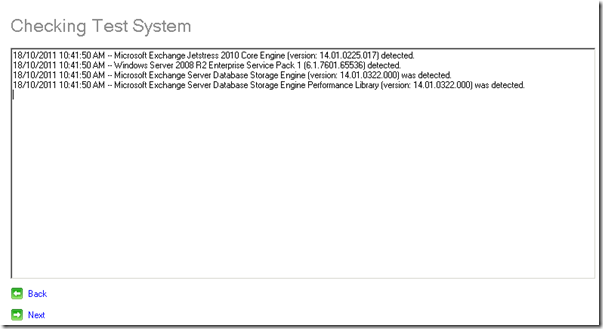
jetstress2

I have since checked the Jetstress installation in my Exchange 2010 Lab which also runs on Windows Server 2008 R2 and this step is not required there, it works fine by just clicking the Jetstress shortcut (no right-click required). Not really worth spending time investigating the cause as it may just be a once-off occurrence, but at least it is now documented.
Chris’s Blog - Now mobile friendly :)

This post is slightly off-topic compared to my regular posts, but its something I’ve been thinking about for some time now and has been one of those things sitting on my to do list that always gets trumped by something more important.

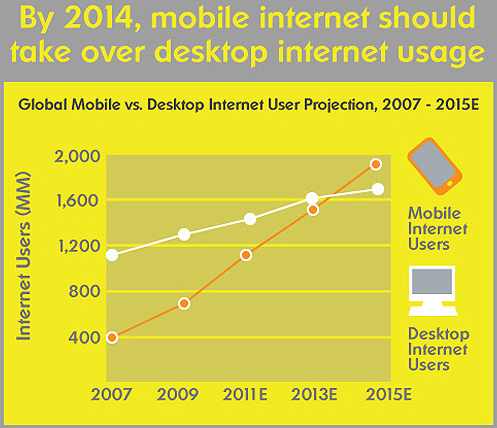
While my blog has never been inaccessible from mobile devices, I have never really put much thought or effort into improving the experience for mobile users. I was recently reading some interesting statistics on the explosive growth of mobile internet usage and that prompted me to do something about it. These statistics are probably best summarised by this:

image

You will now be able to access all the same content from your mobile device in a much more mobile friendly manner. And just because I am a geek I’ve even added a .mobil domain name so you’ll also be able to access it at http://cgoosen.mobi

I also wanted to share this great video that goes into some smartphone mobile marketing statistics. Don’t worry.. I don’t ever intend on introducing ads or marketing of any kind here, I just think the stats are interesting.

Inforgraphic source

Tech-Ed Australia 2011 – Must see sessions

After an interesting and somewhat different keynote, Tech-Ed 2011 has officially kicked off. While everyone is enjoying a few cold ones, I thought I would take the time to tell you about some of the sessions I am excited about attending this year.

There are many great speakers at Tech-Ed this year, these are just some of the sessions I plan to attend.

  • EXL310: "Upgrading to Exchange 2010: Notes from Field" with Colin Lee and Sofiane Behraoui
  • EXL309: "Microsoft Lync 2010: How to go big with voice" with Brendan Carius and Selvan Loganathan
  • OFS-OFC309: "From Zero to Productivity with Office 365" with Ben Walters, Chris Oconnor and Lee Hickin
  • EXL303: "Exchange Server 2010: High Availability Concepts" with Scott Schnoll
  • EXL304: "Load Balancing with Microsoft Exchange Server 2010" with Andrew Ehrensing

Then of course there is my session with Toby Knight, EXL-OFC311: “Microsoft Office 365: From Simple Migration to a Hybrid Environment” we will be in Arena 1B at 5 PM tomorrow… we’ve got some great schwag so make sure you stop by!

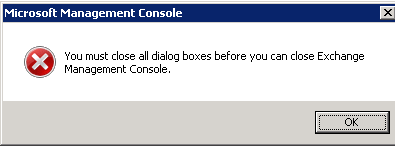
Exchange 2010 “You must close all dialog boxes before you can close Exchange Management Console”

I’ve seen this error around a few times over the last while but have never really paid too much attention to it:

image

It seems it only occurs in the management console if you have IE9 installed on your Exchange 2010 SP1 server. Previously the recommendation was to uninstall IE9 or just live with it. I recently installed Update Rollup 5 for Exchange 2010 SP1 in my lab environment and it seems to have fixed this error.

Obviously I would recommend thorough testing before deploying any updates in production, but I thought it would be worth mentioning that it does seem to fix this error as well.

Exchange 2010 remote mailbox move to Office 365 “Microsoft Exchange Critical Error”

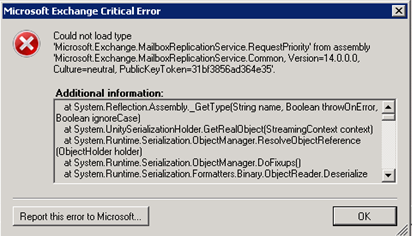
I’ve been having a problem with remote mailbox moves to Office 365. The move completes successfully and everything works ok, but it always generates the following error:

“Could not load type 'Microsoft.Exchange.MailboxReplicationService.RequestPriority'…”

image

I’ve seen this mentioned a few times on the Office 365 community forums and some of my colleagues are also seeing this. The good news is that after installing Update Rollup 5 for Exchange 2010 SP1 this error no longer appears.

Update Rollup 5 for Exchange Server 2010 Service Pack 1

Earlier today the Exchange team announced the release of Update Rollup 5 for Exchange Server 2010 Service Pack 1. Update Rollup 5 for Exchange Server 2010 SP1 resolves the issues that are described in the following Microsoft Knowledge Base articles:

  • 2275156 - The inline contents disposition is removed when you send a "Content-Disposition: inline" email message by using EWS in an Exchange Server 2010 environment
  • 2499044 - You cannot save attachments in an email message by using OWA if the subject line contains special characters in an Exchange Server 2010 environment
  • 2509306 - Journal reports are expired or lost when the Microsoft Exchange Transport service is restarted in an Exchange Server 2010 environment
  • 2514766 - A RBAC role assignee can unexpectedly run the Add-ADPermission command on an Exchange Server 2010 server that is outside the role assignment scope
  • 2529715 - Slow network or replication issues after you change the number of virus scanning API threads in Microsoft Exchange Server 2010
  • 2536704 - Mailbox users who are migrated by using ILM 2007 cannot use the Options menu in OWA in an Exchange Server 2010 environment
  • 2537094 - French translation errors occur when you edit a response to a meeting request by using OWA in an Exchange Server 2010 SP1 environment
  • 2554604 - A RBAC role assignee can unexpectedly manage certificates that are outside the role assignment scope in an Exchange Server 2010 environment
  • 2555800 - You cannot use the GetItem operation in EWS to retrieve properties of an email message in an Exchange Server 2010 environment
  • 2555850 - You cannot delete a mailbox folder that starts with a special character in its name by using Outlook in an Exchange Server 2010 environment
  • 2556096 - The columns in the .csv logging file are not lined up correctly when you perform a discovery search on a mailbox in an Exchange Server 2010 environment
  • 2556107 - The columns in the .csv logging file are not lined up correctly when you perform a discovery search on a mailbox in an Exchange Server 2010 environment
  • 2556133 - A device that uses Exchange ActiveSync cannot access mailboxes in an Exchange Server 2010 environment
  • 2556156 - Extra.exe crashes when it performs RPC activity checks against an Exchange Server 2010 server
  • 2556352 - "ChangeKey is required for this operation" error message in Outlook for Mac 2011 in an Exchange Server 2010 environment
  • 2556407 - Certain client-only message rules do not take effect on email messages that are saved as drafts in an Exchange Server 2010 environment
  • 2559926 - "There are no items to show in this view." error message when you try to view a folder by using Outlook in an Exchange Server 2010 environment
  • 2572958 - The "Test-OutlookConnectivity -Protocol HTTP" command fails with an HTTP 401 error in an Exchange Server 2010 environment

For more information, click here

To Download, click here