In this episode we are joined by guest Kirsty McGrath, a Microsoft MVP and adoption expert, for an insightful conversation on working smarter in today’s AI-driven workplace. Kirsty shares her extensive experience leading adoption programs across Australia and consulting with top Microsoft clients, offering practical wisdom on the importance of user training and change management in maximizing the impact of tools like Microsoft Copilot.
The episode delves into the common confusion users face when navigating Microsoft 365’s vast ecosystem—especially with tools that overlap or are frequently updated. Kirsty emphasizes that adoption isn’t just about assigning licenses; it’s about helping people understand, trust, and effectively use technology. She also about the psychological and organizational barriers to change—how emotional comfort zones can prevent users from embracing new tools, and why strong change management can significantly reduce help desk pressure and improve employee satisfaction
For more information on The Cloud Architects podcast, check us out on SoundCloud
In this episode Chris shares 5 things you should configure in Microsoft 365 to make your tenant more secure and Koos introduces “Summary Rules” in Microsoft Sentinel. What are “Summary Rules”? And what new opportunities might bring it to your logging strategies?
5 ways to harden your Microsoft 365 tenant Security
There are many out-of-the-box configurations in M365 that are optimized for productivity and less than optimal from a security perspective. I thought it would be a good idea to go back to the basics today and talk about 5 things you can and should be doing to make your tenant more secure.
Disable user app registration
Setting “Users can register applications” to “No” in Microsoft 365 is a security measure to prevent users from registering their own applications within the organization’s environment. Here’s why this can be important:
Prevent Unauthorized Access: By default, users can register applications that use Azure AD authentication. If misconfigured, these apps could introduce security risks or allow unintended access to sensitive data.
Reduce Shadow IT: Without restrictions, users might create and integrate applications that bypass IT governance, potentially leading to security vulnerabilities or compliance issues.
Enhance Governance and Control: This setting ensures that only IT administrators or designated personnel can register applications, maintaining oversight and control over app integrations.
Minimize Data Exposure Risks: Some applications require extensive permissions to function, including access to organizational data. Disabling user registration prevents apps from accessing sensitive information without approval.
If your organization requires certain users to register applications, you can manage this through specific roles and policies rather than leaving it open to all users.
Navigate to Microsoft Entra admin center https://entra.microsoft.com/
Click to expand Identity > Users select Users settings.
Set Users can register applications to No.
Click Save.
Disable User consent for applications
Setting “User consent for applications” to “Do not allow user consent” in Microsoft 365 enhances security and governance by ensuring only administrators control which applications can access organizational data. Here’s why it’s a recommended practice:
Prevent Data Exposure: Users may unintentionally grant excessive permissions to third-party apps, risking sensitive data exposure.
Reduce Security Vulnerabilities: Some apps request broad access scopes, which could lead to unauthorized data leaks or malicious exploitation.
Maintain Compliance: Organizations handling regulated data need strict access controls to meet security and privacy standards.
Ensure IT Oversight: Administrators can vet applications before approving access, reducing the risk of shadow IT and unmanaged integrations.
If you need flexibility, you can configure specific consent policies, allowing only trusted applications or designated users to request access. Tenant-wide admin consent
can be requested by users through an integrated administrator consent request workflow or through organizational support processes
Navigate to Microsoft Entra admin center https://entra.microsoft.com/
Click to expand Identity > Applications select Enterprise applications.
Under Security select Consent and permissions > User consent settings.
Under User consent for applications select Do not allow user consent.
Click the Save option at the top of the window.
Allow collaboration invitations to trusted domains only
Restricting user invitations to specified domains in Entra ID is a security best practice that ensures external collaboration remains controlled and aligned with organizational policies. Here’s why it’s a good idea:
Prevent Unauthorized Access: Users might unintentionally invite people from untrusted or personal domains, increasing security risks.
Enhance Data Protection: Limiting invitations to approved domains ensures sensitive organizational data isn’t exposed to unverified external users.
Maintain Compliance: Certain industries require strict access controls to meet regulatory standards like GDPR or HIPAA.
Reduce Risks from Shadow IT: Without restrictions, users might invite external collaborators without IT oversight, leading to unmanaged data sharing.
Strengthen Identity Governance: Ensuring invitations align with approved domains prevents identity management inconsistencies and helps enforce security policies.
If your organization regularly collaborates with specific external partners, this policy ensures that only trusted domains are allowed. You should ensure that you have a process users can follow to request a trusted domain.
Navigate to Microsoft Entra admin center https://entra.microsoft.com/
Under Collaboration restrictions, select Allow invitations only to the specified domains (most restrictive) is selected. Then specify the allowed domains under Target domains.
Manage SharePoint external sharing through domain allow lists
Setting SharePoint to limit external sharing by domain is a strategic way to maintain security, control data access, and prevent unauthorized sharing. Here’s why it’s a good practice:
Prevent Data Leaks: Without domain restrictions, users could accidentally share sensitive files with untrusted or personal email accounts.
Enhance Security: Limiting sharing to specific domains ensures external collaboration only happens with verified partners.
Maintain Compliance: If your organization handles regulated data, restricting external sharing helps meet privacy and security standards.
Reduce Insider Risks: Prevents users from sharing data with competitors or unauthorized third parties, safeguarding intellectual property.
Ensure IT Governance: Provides administrators visibility and control over external sharing, reducing shadow IT and unmanaged file access.
If your organization regularly collaborates with specific external entities, this policy allows seamless access while keeping security tight.
Navigate to SharePoint admin center https://admin.microsoft.com/sharepoint
Expand Policies then click Sharing.
Expand More external sharing settings and check Limit external sharing by domain.
Select Add domains to add a list of approved domains.
Click Save at the bottom of the page.
Disable communication with unmanaged Teams users
Setting “People in my organization can communicate with unmanaged Teams accounts” to “Off” in Microsoft Teams is an important security measure to control communication and prevent unauthorized data sharing. Here’s why it matters:
Prevent Unverified Communication: Unmanaged accounts may belong to individuals who aren’t formally part of your organization, increasing security risks.
Enhance Data Protection: Prevents sensitive conversations, files, and messages from being exchanged with untrusted accounts.
Reduce Insider Threats: Ensures that only verified, managed accounts can interact with internal users, lowering the risk of data leaks.
Maintain Compliance: Certain regulations require organizations to manage and track external communications, and allowing unmanaged accounts may violate those policies.
Improve IT Governance: Keeps communication within approved boundaries, reducing shadow IT risks and unmanaged collaboration.
If your organization needs to collaborate externally, setting up verified guest accounts or using controlled external access policies is a safer alternative.
Navigate to Microsoft Teams admin center https://admin.teams.microsoft.com/
Click to expand Users select External access.
Select the Policies tab
Click on the Global (Org-wide default) policy.
Set People in my organization can communicate with unmanaged Teams accounts to Off.
Click Save.
Sentinel Summary Rules
In episode 4 back in March I spoke about the different table tiers in Sentinel. Auxiliary tier was still in preview back then, now it’s GA. But one of the downsides to these lower-tiered table plans is that you can’t use the data for real-time incident creation with your Sentinel Analytic Rules.
And as I eluded earlier; you might want to consider looking into Azure Data Explorer for this reason alone since the costs will even be lower there.
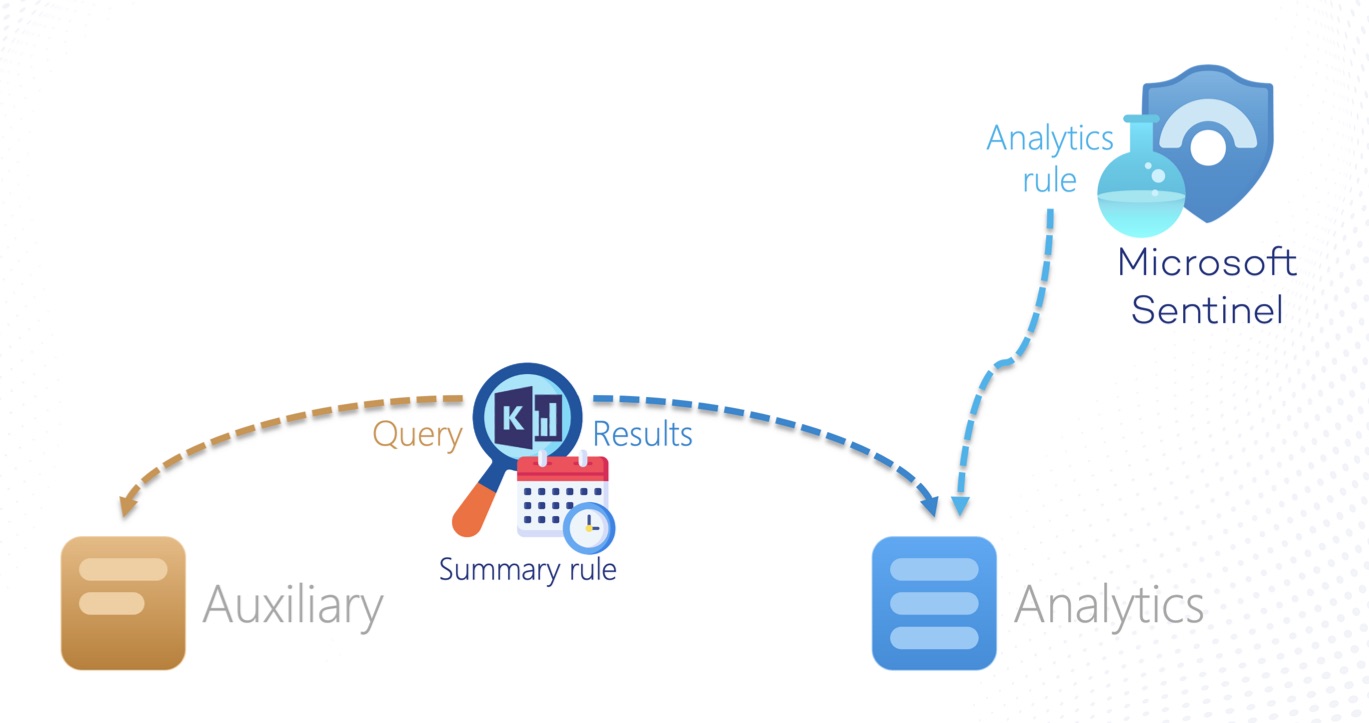
Well, with Summary Rules I think Microsoft took a nice step into the right direction for making sure customers keep their data in Sentinel by increasing the value of logs in Auxiliary and Basis tables.
What is a Summary Rule?
Aggregate large sets of data in the background
Sort of “Scheduled KQL queries”
Results are stored in separate Analytics table(s)
Example scenarios
Quickly find potential malicious IPs in your network as part of triage
Generate alerts on TI indicator matches
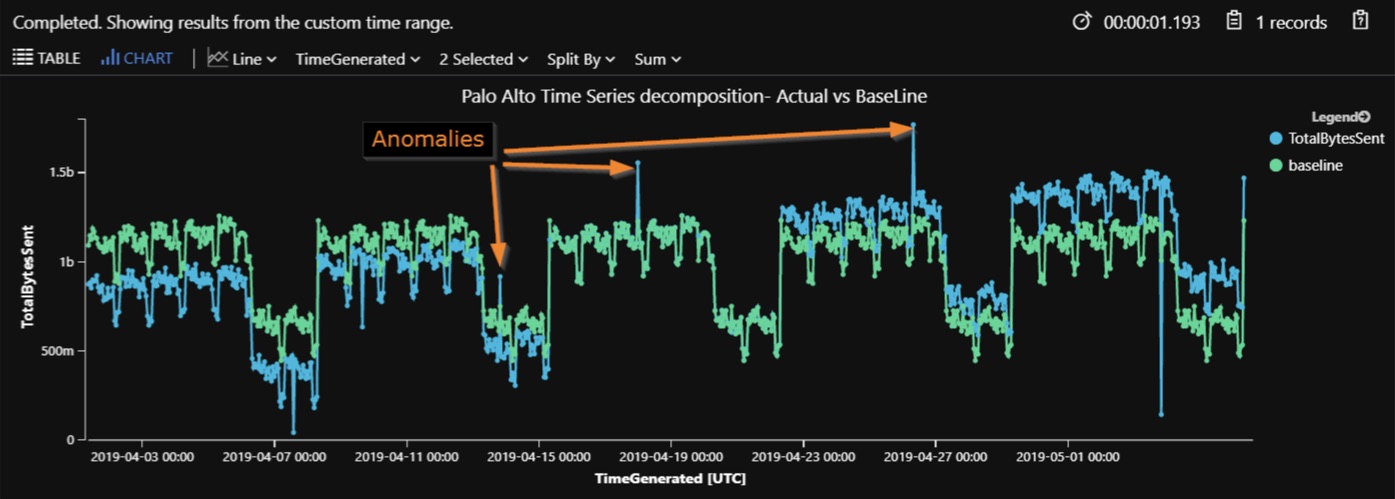
Trigger alerts on baseline anomalies (i.e. TotalBytesSent)
Bring down retention cost by summarizing high-volume tables (i.e. MicrosoftGraphActivityLogs)
But remember
Still keep an eye on query performance!
Enable monitoring and create an alert rule:
LASummaryLogs
| where Status !in("Succeeded", "Started")
Summary rule creation needs Sentinel Contributor, but tables creation needs at least Log Analytics Contributor
SIEM-as-a-Code deployments should also take destination table creation into account
Microsoft MVP Eric Mannon has created a very elaborate Toolkit for Defender for Endpoint! His experiences in the SecOps space led to the creation of a set of tools which can help with day-to-day incident response tasks in MDE environments.
It consists of:
PowerShell module MDEAutomator
Provides cmdlets for authentication, profile management, live response, response actions, custom detections, advanced hunting and threat indicator management in MDE.
# Install & Import from PowerShell GalleryInstall-Module-NameMDEAutomator-AllowClobber-ForceImport-Module-NameMDEAutomator-ErrorActionStop-Force
Several Azure Functions (also built on PowerShell leveraging his MDEAutomator module)
MDEDispatcher
Automates bulk management of response actions delivered to endpoints.
MDEOrchestrator
Automates bulk management of Live Response commands.
MDEProfiles
Automates bulk delivery of custom PowerShell scripts to configure policy on MDE endpoints.
MDETIManager
Automates management of Threat Indicators (IOCs) in Microsoft Defender for Endpoint.
MDEAutoHunt
Automates bulk threat hunting and exports output to Azure Storage.
MDECDManager
Automates synchronization of Custom Detections from a blob container.
And make sure to follow Eric on LinkedIn! He not only has some useful insights for Incident Response challenges, SIEM and Microsoft Security products in general, his posts are also very enjoyable and funny to read.
In this episode we are joined by guests Ernie Anderson and Darrell Switzer from TBDCyber to discuss the critical topic of incident response (IR). Ernie and Darrell share their insights and experiences in IR. They highlight the importance of having a well-prepared incident response plan, how to effectively use EDR tools, and the value of proactive measures such as vulnerability testing and tabletop exercises. We also discuss the challenges of modern ransomware attacks, the role of cyber insurance, and the need for adaptive communication strategies during incidents. Both guests underscore the necessity of constant updating, testing, and training to ensure organizational resilience against cyber threats.
For more information on The Cloud Architects podcast, check us out on SoundCloud
In this episode we look at one of Defender XDRs most exiting features at the moment: Attack Disruption! Why it is so exiting and how you can start using it today?
Defender XDR Attack Disruption
Attack Disruption automatically identifies compromised assets and it will be able to stop attackers in their tracks in real-time. So, while the attack is happening!
It’s not new. It’s around since somewhere in 2023. But new features are added constantly and I think it’s one of the most exciting features of Defender XDR!
Attack Disruption is not primarily about detection. Most security products today will work like this: “we saw certain events, here’s the evidence, please investigate it and respond”. Microsoft wants to move away for this and provide actual protection and stop the attackers when they’re active.
By combining multiple Security products, bring signals together to dynamical and automatically detect and response to a threat.
According to Microsoft it does this “in real-time” (“at machine speed” ;-) ) and “with high confidence” to contain and prevent (further) damage.
Works in several different stages
Detection
Correlated sign as from multiple sources are combined into a single high-confidence incident
Correlation
Classify attack scenario and identify assets controlled by the attacker
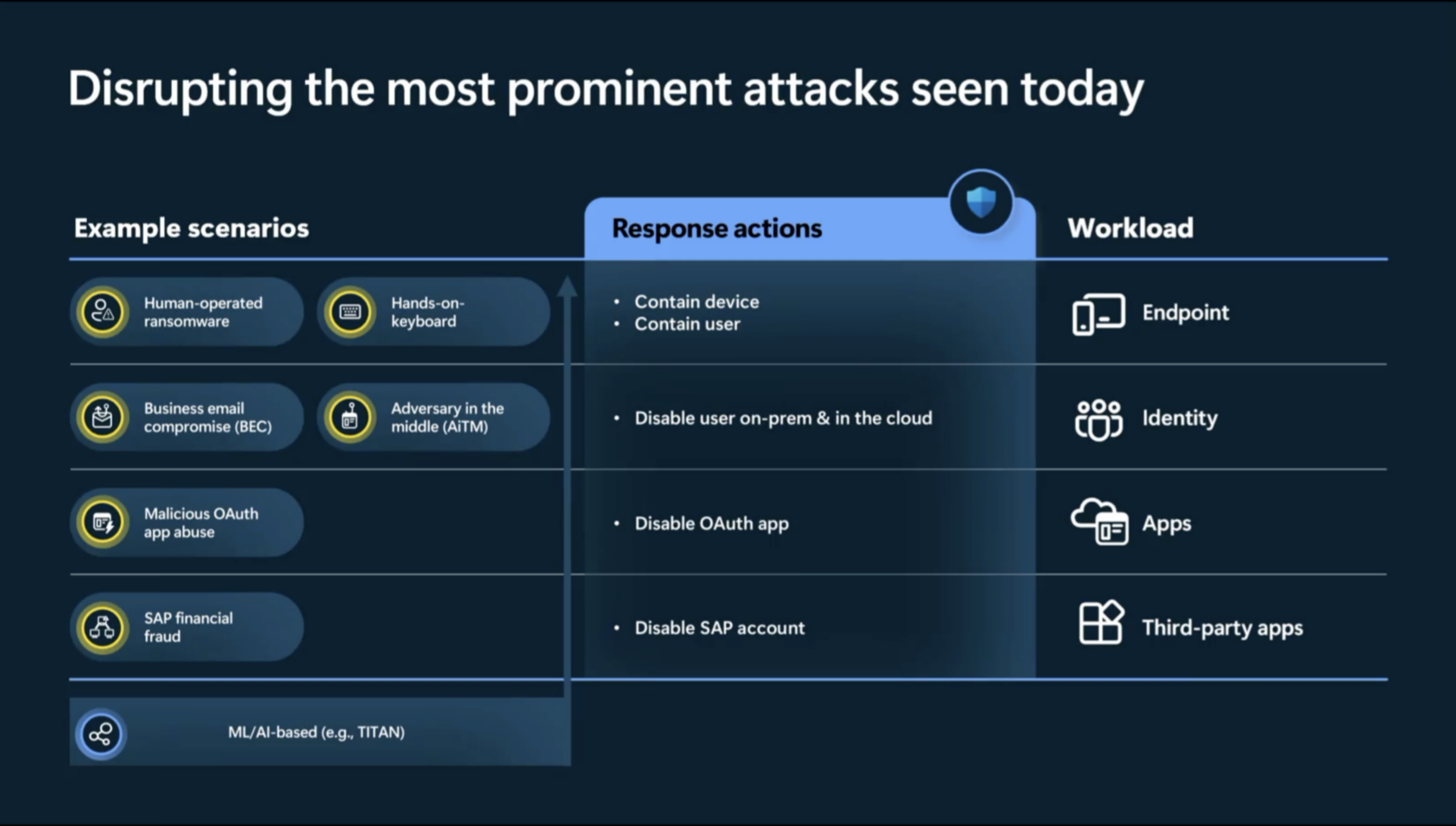
Couple of scenario’s which are supported by Attack Disruption are: Human Operator Ransomware, Business email compromise, Adversary in the middle and Password Spray attacks among other.
Intent Recognition
Understand the intent of the attacker to accurately predict their next move & identity attack scenario. This is not pre-determined but dynamically build based on your organizations Attack Paths.
Attack Disruption
As the attack evolves it automatically identifies compromised assets (users, devices, mailboxes, apps, …) to determine a “blast radius” 🧨 within your network. It will then be able to suspends compromised assets in real-time.
AI-powered automation
(Because we need some AI in our product of course 😎)
Leaves the SOC in full control of investigation and remediating but limits the impact of an attack by stopping lateral movement.
Respond actions currently supported:
Device contain
User contain
Disable user
But also first third-party support with SAP with Microsoft Sentinel. For example contain compromised assets by locking suspicious SAP users in case of a financial process manipulation attack.
They’re not only using signals from multiple different products (Endpoint, Office, Cloud Apps….) but also using these product to respond/contain the attack.
For example MDE is used to contain the device and prevent lateral movement, while EntraID is used to contain the user AND MDI is used to contains the on-prem users. Also to prevent having to rely on a sync. The fast to disrupt the attack the better
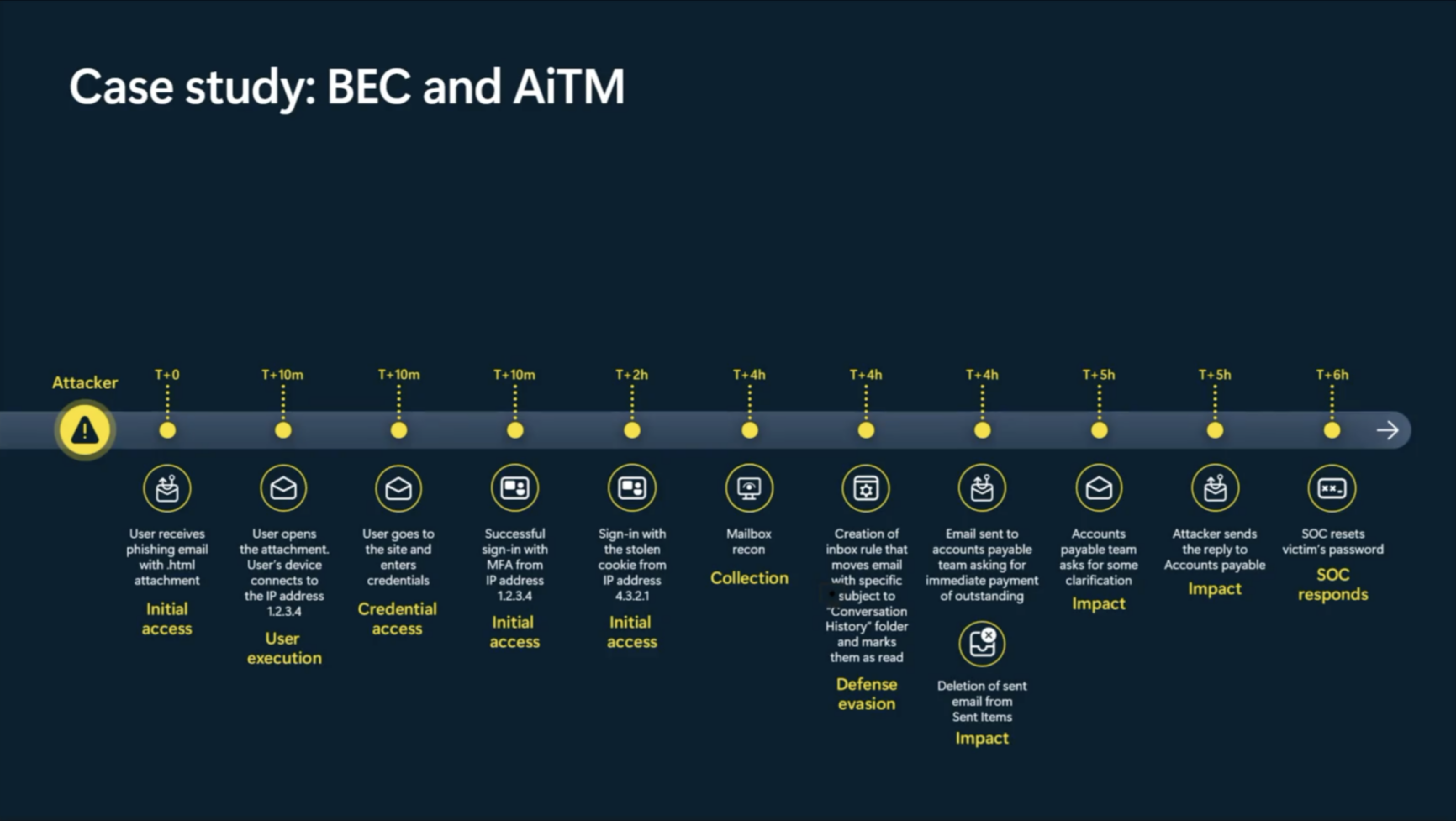
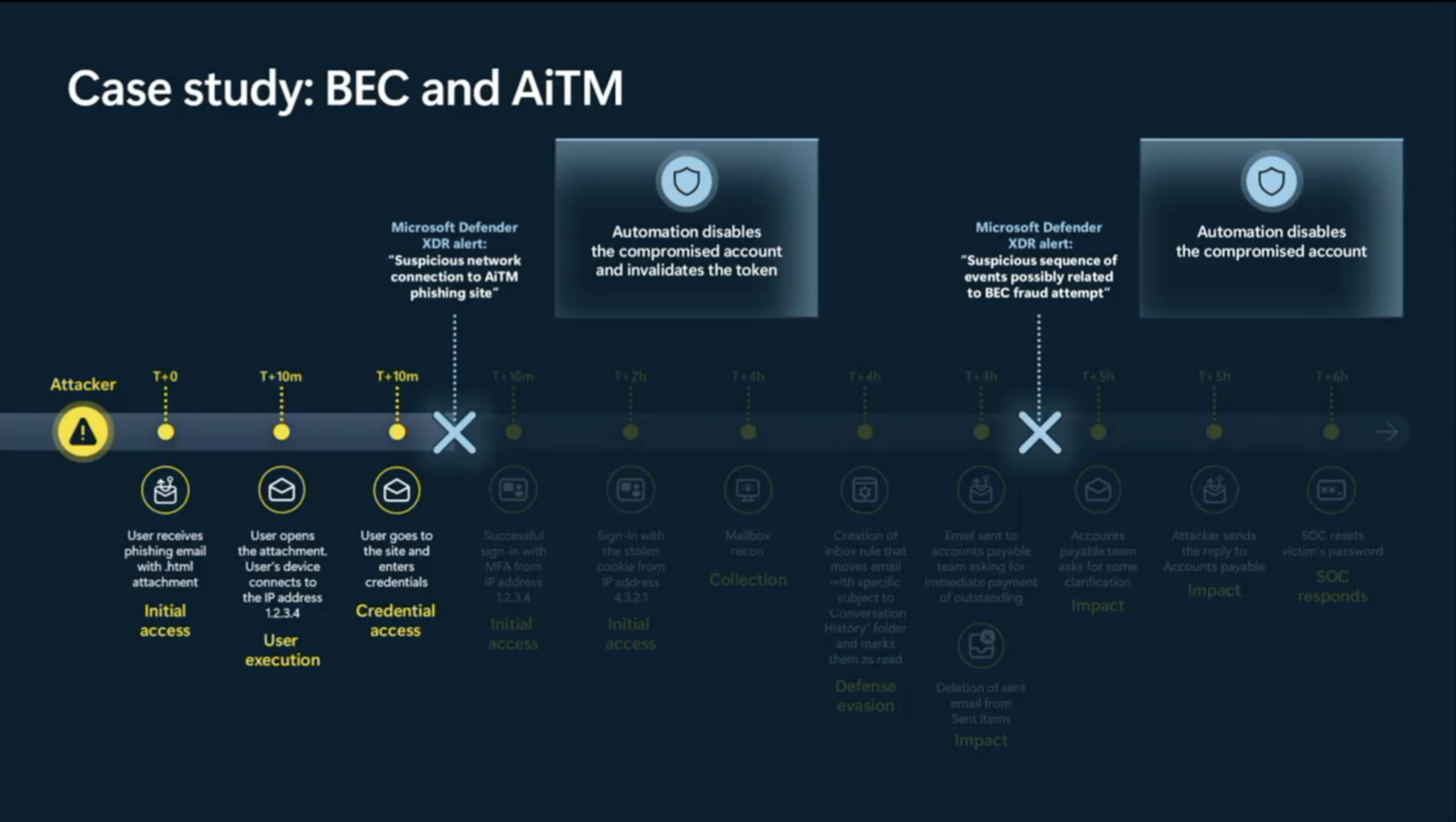
A real-world example of Business e-mail compromise (BEC) and adversary in the middle attack (AitM)
Not only was attack disruption able to disable a compromised account.
It was able to detect the AitM attack as well and invalidate the token of that compromised account.
Customer Grading
How customers respond (and other kinds of signals and behavior) determines the quality of the signal-to-noise ratio. According to Microsoft: only < 1% of false positives (99%+ true positive rate)
Due to the impactful native of the respond actions, attack disruption is designed to rely on high-fidelity signals only.
Microsoft learns from customer behavior surrounding a “attack disruption” type of incident.
You can look in your security portal and search for incidents with an “attack disruption” tag to find earlier incidents where Microsoft did perform some automated response actions.
Microsoft also learns from attack disruption incidents across orgs and harvest telemetry data to intervene ever quick at other customers.
According to Microsoft they’re disrupting 40.000 incidents a month.
How to use
Attack Disruption is enabled by default. But there are certain configurations you should look into for optimal usage.
Defender for Endpoint
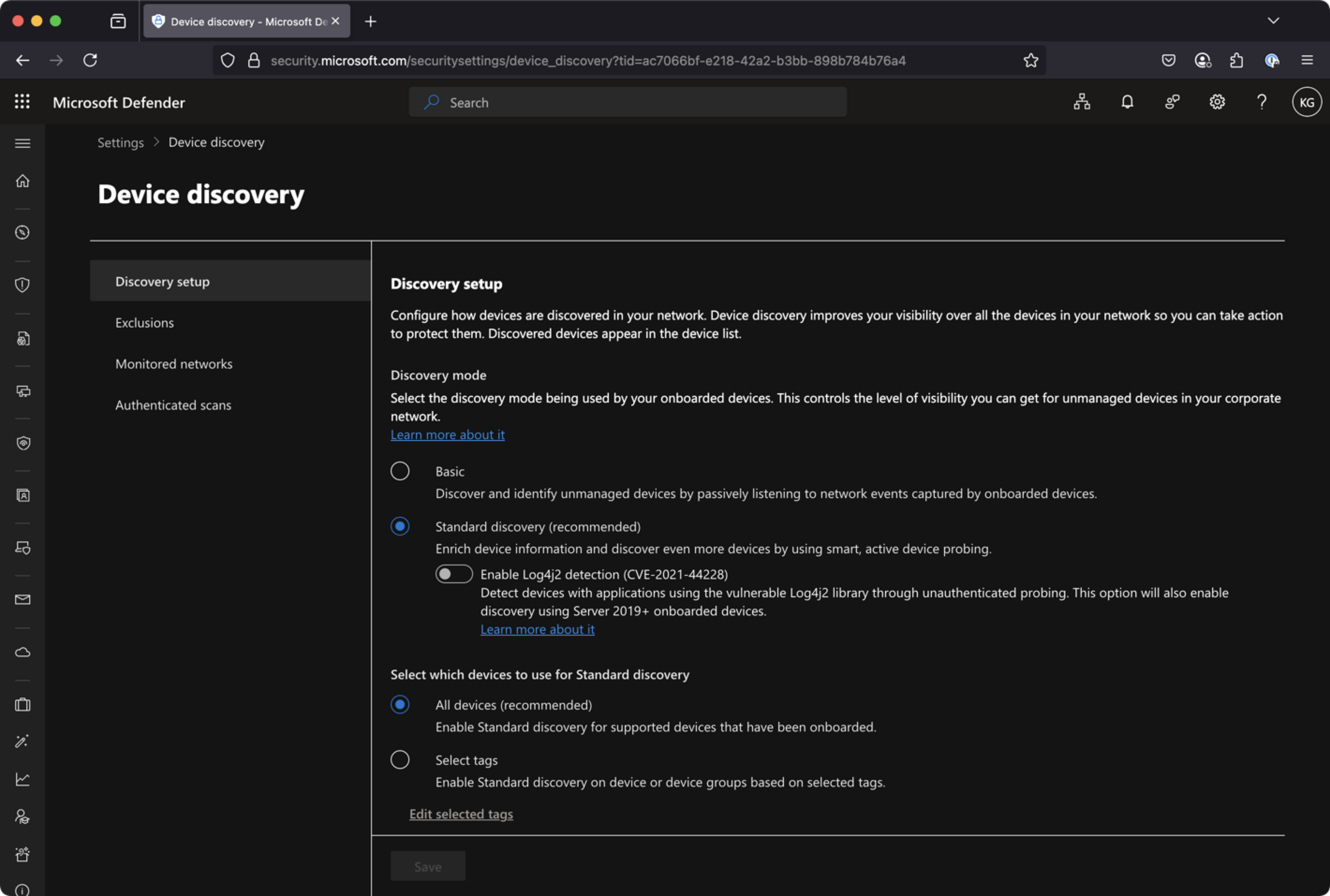
Attack disruption relies heavily on Defender for Endpoint’s discovery and contain capabilities. Go to Settings –> Device discovery and make sure that Discovery mode is set to “Standard” (not basic) for “all devices”.
You can always check if there are any discovered devices in your environment:
DeviceInfo
| summarize arg_max(Timestamp, *) by DeviceId  // Get latest known good per device Id
| where isempty(MergedToDeviceId) // Remove invalidated/merged devices
| where OnboardingStatus != "Onboarded"
Make sure your automation is set to Full Remediation. Go into Settings –> Endpoint –> Device Groups –> Remediation level.
Endpoint need to run Sense agent v10.8470 or newer. Check the DeviceTvmSoftwareInventory table to verify and find outdated clients
DeviceTvmSoftwareInventory
| where SoftwareVendor has "microsoft" and SoftwareName has "defender_for_endpoint"
| extend MajorVersion = toint(split(SoftwareVersion, '.')[0])
| extend MinorVersion = toint(split(SoftwareVersion, '.')[1])
| where MajorVersion == 10
| where MinorVersion < 8470
Perhaps needless to say, but you need to make sure that all of your devices run Defender for Endpoint. Regularly check for non-onboarded discovered in your environment. (Devices –> Assets)
DeviceInfo
| where OnboardingStatus != "Onboarded"
| summarize lastSeen = arg_max(Timestamp, *) by DeviceId
| where isempty(MergedToDeviceId)
| limit 100
| invoke SeenBy()
| project lastSeen, DeviceId, DeviceName, DeviceType, SeenBy
Defender for Identity
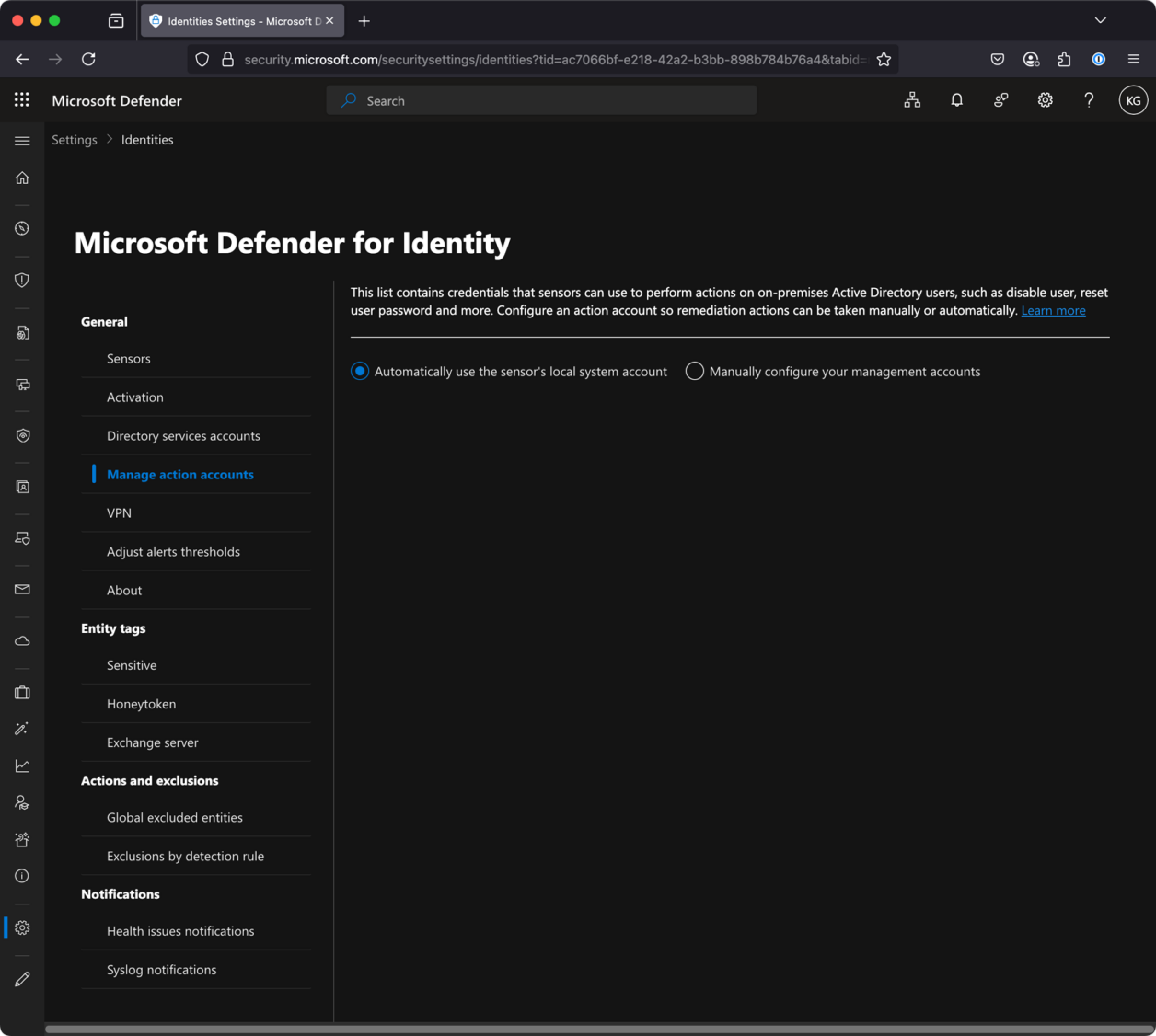
Within Defender for Identity you need to check your “Action Accounts”. (Settings –> Identities –> Manage action accounts)
Here you have two options:
Automatically use sensor’s local system account
Manually configure and use a Group Managed Service Account (gMSA)
If you have chosen the latter, make sure that account still exists!
Also make sure all your sensors are healthy. Because MDI relies heavily on proper setup of auditing policies.
Defender for Cloud Apps
Microsoft Defender for Cloud Apps must be connected to Microsoft Office 365 through the connector. Check the instructions here.
I think it’s good practice to enable some form of notifications for certain actions (i.e. disable user, contain device). For example a user gets disabled, and within a short while somebody else tries to resolve an issue by enabling this user again.
It’s useful to notify stakeholders about the fact that someone (including Microsoft’s attack disruption) took this action.
Exclusions
You can also exclude certain device groups/entities from Attack Disruption. It’s not recommended! But sometimes necessary.
Microsoft 365 Security Incident Investigation Tool (for Exchange Online)
Microsoft MVP Mezba Uddin has created a PowerShell script to help administrators investigate and respond to potential security incidents in Exchange Online. The script can perform six specific investigation actions in Exchange Online. Each action targets a common post-incident scenario using either audit log searches or Graph API queries, depending on what’s most effective for the individual scenario:
Booting high on community energy! In this special in-person episode, recorded on-site at the Microsoft Campus during the MVP Summit 2025, Koos and Chris share behind-the-scenes insights, tech trends, and reflections on the evolving security landscape—all while dodging T-shirt printers and Summit buzz.
🏙️ MVP Summit Experience
First time recording in person!
Koos and Chris reflect on how special it is to collaborate live, normally split by time zones.
Value of meeting with product teams and MVP peers from around the world.
🧩 Capture the Flag Challenge
Microsoft’s hands-on CTF challenge provided deep XDR visibility.
Realistic red-team simulation in Defender showed how challenging threat hunting can be.
Koos & Chris share a new appreciation for SOC analysts sifting through complex telemetry.
🤖 Security Copilot + Agents
Microsoft announced Security Copilot Agents at Summit.
These “agentic AI” bots can handle tasks like phishing triage and vulnerability remediation.
Koos went from skeptic to fan—Agents reduce the need for custom logic app workflows.
Built-in dashboards now show time saved per task, helping justify ROI.
🕵️♂️ Threat Hunting with the GHOST Team
Microsoft’s GHOST Team: Global Hunting Oversight and Strategic Triage.
Proactive hunting using advanced logs and behavioral anomalies.
Emphasis on graph logs and assumed breach strategies.
Outputs include improved detection rules and real-world attacker insights.
🔐 Identity & MFA – Still the #1 Target
Identity remains the primary attack vector.
Stop excluding MFA for office IPs or “trusted” users.
Embrace phishing-resistant MFA like passkeys.
Avoid risky group-based MFA exclusions—opt for dedicated groups or per-user control.
⚙️ Conditional Access & workload Identities
Time to revisit and enrich older CA policies.
Add device compliance and user risk signals (especially with Entra P2).
Use tools like risk-based CA and sign-in risk to block compromised accounts.
Apps and service principals are still a weak link in many orgs.
Add CA rules to Applications (Workload Identities) to further heighten security (e.g. IP filtering).
Because App secrets often go unmanaged and unrotated.
🧭 Final Thoughts
Many attacks still succeed due to weak fundamentals: open ports, unpatched systems, overly-permissive apps.
Mastering the basics remains critical.
In-person energy made this episode extra special! 🙏🏻
🛠️ Community Project
Device Offboarding Manager
Microsoft MVP Ugur Koc has created a great PowerShell GUI tool for efficiently managing and offboarding devices from Microsoft Intune, Autopilot, and Entra ID, featuring bulk operations and real-time analytics for streamlined device lifecycle management. At it’s core, the tool features:
Multi-Service Integration: Manage devices across Intune, Autopilot, and Entra ID
Bulk Operations: Support for bulk device imports and operations
Real-time Dashboard: View device statistics and distribution
Secure Authentication: Multiple authentication methods including interactive, certificate, and client secret
I really like the playbooks feature that allows automation and support for specific custom scenarios.
At Microsoft Ignite 2024, we sat down with our old friend Anthony Bartolo to discuss the industry’s shift from traditional infrastructure roles to development, a transition heavily influenced by AI and automation.
As companies increasingly adopt “vibe coding” — the trend where developers focus on rapid prototyping and intuition-driven coding rather than rigid syntax — Anthony’s journey is a perfect example of how infrastructure professionals are embracing this new paradigm. He shared his experience moving from network engineering to full-stack development, and how AI tools helped bridge knowledge gaps. This aligns with vibe coding’s emphasis on leveraging AI-assisted development to lower entry barriers, allowing generalists to build functional applications without deep technical expertise. The discussion highlighted how AI is democratizing software creation, empowering both infrastructure specialists and non-traditional coders to build solutions quickly. While AI lowers the barrier to entry, it also raises questions about shallow expertise and long-term sustainability. Are we building real solutions or just stitching together AI-generated snippets with no real understanding?
Chris revisits his e-mail authentication and security from last time to dig a little deeper.
Koos recently did some talks about SIEM migrations to Sentinel and keeping things as cost-efficient as possible. He also believes a company shouldn’t focus solely on Microsoft Sentinel, and should consider looking into alternatives alongside it like Azure Data Explorer. And why are companies so focussed on collecting all those logs in a “legacy” matter?
E-mail Security - Part II
Sequels aren’t always better, but this is an exception. ;)
In this episode, I’ll dive a little deeper into SPF clean-up and flattening and spend some time looking at some newer email security protocols:
Authenticated Received Chain (ARC)
MTA-STS (Mail Transfer Agent Strict Transport Security)
To follow on from our previous discussion on SPF, In an SPF record, there isn’t a strict limit on the number of IPv4/6 blocks (ip4/6: mechanisms) you can include. However, there are practical constraints:
DNS Lookup Limit – SPF allows a maximum of 10 DNS lookups (e.g., include, a, mx, ptr, exists) per evaluation. ip4 and ip6 do not count towards this limit because they are directly included in the record.
DNS TXT Record Length – A single TXT record (which SPF uses) is limited to 255 characters per segment, but multiple segments can be concatenated. The practical SPF record size limit is about 450–512 characters to avoid truncation issues. If the SPF record exceeds 512 bytes, some email servers may reject it.
If you have too many DNS lookups, a “SPF PermError: too many DNS lookups” is returned during an SPF check, DMARC treats that as fail since it’s a permanent error. There is one solution to this problem that is recommended all over the interwebs called “flattening” an SPF record. Using this method, each of the DNS-querying mechanisms/modifiers is queried for the IP addresses and these then replace the original mechanism/modifier thus reducing the number of DNS lookups. This is great, right?
Danger, Will Robinson!
I don’t personally recommend using SPF flattening unless absolutely necessary, with regular audit and cleanup you may not need it. It is also important to consider that:
IP addresses do change and can break email delivery
Flattening requires more administrative overhead to managed IP changes.
There are ‘dynamic SPF’ services available that market themselves as a solution to this - I haven’t got any personal experience with these so YMMV. Please reach out if you have any good or bad experience you’d like to share.
Authenticated Received Chain (ARC)
ARC is an email security mechanism that preserves authentication results (SPF, DKIM, and DMARC) when an email passes through forwarders, mailing lists, or intermediaries.
How ARC Works:
The original sender sends an email → SPF, DKIM, and DMARC checks are performed.
A forwarder (e.g., a mailing list, forwarding service) receives the email.
The forwarder signs the email with ARC headers before sending it to the final recipient.
These headers include:
ARC-Authentication-Results → Records SPF/DKIM/DMARC results before forwarding.
ARC-Seal → Cryptographically signs the ARC chain to prevent tampering.
ARC-Message-Signature → Ensures integrity of the forwarded message.
The recipient verifies the ARC chain to decide if it should trust the forwarded email.
Microsoft 365 already supports ARC, but if you run into issues with email delivery from a particular service, you can add their particular domain to the ARC trusted sealers list in the Microsoft 365 Defender portal
MTA-STS (Mail Transfer Agent Strict Transport Security)
One of problems with SMTP is that encryption is entirely optional. When support for upgrading from plaintext to encryption in the form of the STARTTLS command was added to SMTP the specification explicitly specified that SMTP servers must accept plaintext connections. MTA-STS is a new standard that aims to improve the security of SMTP by enabling domain names to opt into strict transport layer security mode that requires authentication and TLS. MTA-STS is supported in Exchange Online.
Side note: You may have heard of DANE (DNS-Based Authentication of Named Entities) - DANE requires DNSSEC, which many domains do not implement and therefore kills adoption. MTA-STS is easier to deploy and works with standard DNS.
Microsoft Sentinel as a SIEM and how to re-think logging strategies
Microsoft Sentinel celebrated it’s fifth anniversary already last September. But a lot has changed since:
Sentinel’s role as an orchestrator between all the different security products (“all your Defenders are belong to us”)
New log tiers, each with it’s own pros and cons
Auxiliary
Sentinel is now also part of the “Unified Security Operation Platform”, but it’s still an Azure resource?
During SIEM migrations the topic of Sentinel cost is a big topic.
Cloud-native SIEM works a bit different compared to a (dare I say) “legacy” SIEM solution.
“Sentinel is expensive” people might say, but you might be using it wrong.
Consider a multi-tiered log strategy:
Real-time analytics
Triage & Hunting
Compliance & Forensics
Consider NOT ingesting those logs any longer ;)
Please hear me out….
Be critical during SIEM migrations
Decide per log source what to move or what to drop
Azure Data Explorer
Very cost effective companion in my opinion to use alongside Sentinel.
Very scalable and offers UNLIMITED data retention
Query logs with KQL
Community Project
Yellowhat
We already have Blackhat and Bluehat, but now there’s Yellowhat! 👷🏻♂️
A couple of Security MVPs came together to organize a 100% Microsoft Security conference on March 6th 2025.
Only deep-dive sessions (Level 400+) led by world-class experts, including Raviv Tamir (Microsoft ILDC), Roberto Rodriguez (Microsoft Redmond), Dirk-jan Mollema, and more announcements soon.
All sessions will be broadcast live between 3pm and 9pm CET.
But there are also a few last VIP tickets for in-person visit. Hosted at Microsoft HQ @ Amsterdam and made possible with some great sponsors!
Another great project by Merill Fernando. Bluesky.ms is the authoritative source for Microsoft community-related activity on Bluesky. Its a crowdsourced database of anyone and everyone in the Microsoft community on Bluesky where you can connect with the Microsoft community and get your account verified. Here you can users categorized as:
In this episode we sit down with our old friend Antonio Maio. We recorded this episode at Microsoft Ignite 2024 in Chicago, and as always it was an enjoyable conversation with actionable insights. Antonio shares some tips from this Ignite talk to help you:
Assess your environment at scale
Protect your information
Educate your users
Antonio gives us some great information about preparing for Copilot, why it helps to encourage everyone to build their own relationship with Copilot and how to find the balance between data protection and productivity.
For more information on The Cloud Architects podcast, check us out on SoundCloud
Chris takes a look at email security and digs into SPF, DMARC and all the other acronyms.
Koos recently had some experience with Entra ID Entitlement Management he wants to share. What are Access Packages? And why should you look into it?
E-mail Security
When I working with customers doing security assessments - one of the first things I look at is how they have configured email authentication. I pretty much never find these to be optimized and thought it would be a good idea to break them down for our listeners. Email authentication is a group of standards to identify and prevent spoofing, these standards include:
Sender Policy Framework (SPF): Specifies the source email servers that are authorized to send mail for the domain.
DomainKeys Identified Mail (DKIM): Uses a domain to digitally sign important elements of the message to ensure the message hasn’t been altered in transit.
Domain-based Message Authentication, Reporting and Conformance (DMARC): Specifies the action for messages that fail SPF or DKIM checks for senders in the domain, and specifies where to send the DMARC results (reporting).
Without too much of a deep dive, it’s important to understand that email authentication protocols validate your outbound email - the theory is that if everyone validates the email they send, it becomes easier to identify email sent by bad actors.
SPF
SPF is used to validate the ‘RFC5321.MailFrom’ sender to ensure that the email is being sent by someone authorized for that domain. This validation is done in the form of a SPF record - a TXT record in DNS - you’ve probably seen these, they start with a string: “v=spf1”
When you add a new domain to M365, it will automatically generate a ‘base’ SPF record for you - it’s important to understand that it is the minimum required and does not take into account any other services you may use (payroll, etc) or on-prem email relays you may have so the record should be optimized for your exact needs.
Some tips for optimizing your SPF record:
Use a hardfail ‘-all’
Align SPF and DMARC (more on DMARC shortly)
Monitor your SPF record and clean it up regularly
Limit your records to 10 DNS Lookups - more on SPF clean-up and flattening in future episode
When using DKIM, the receiving server makes a DNS request using the sender’s domain name (RFC5322.From) and obtains the public key from a DNS record in the DNS zone of the sending domain and compares it to the private key in the message from the sending server.
DKIM is easy enough to configure, but it is important to know that it is not configured automatically in M365 for custom domains - you need to create your CNAME records and enabled it yourself. The records are in the format:
selector1._domainkey.domain.com
selector2._domainkey.domain.com
Some tips for implementing DKIM:
Pay attention to your mail routing and where your email is being sent from, i.e, third party providers like Mimecast etc or third party services like Salesforce.
Plan to rotate your DKIM keys every 3-6 months.
DMARC
DMARC essentially ties SPF and DKIM together where the sender specifies what to do with email on behalf of the domain if it does not meet the requirements of SPF and DKIM.
DMARC is implemented as another TXT record starting with the string: “v=DMARC1” - Once you have implemented a record, receiving servers can verify the incoming email based on the DMARC policy. If the email fails the check, the email can be delivered, quarantined, or rejected - based on the instructions in the DMARC record. DMARC will pass if the RFC5321.MailFrom and RFC5322.From are equal, and/or SPF and DKIM are aligned.
Some tips for implementing DMARC:
You should always use p=reject - only time to use anything else is when first implementing a DMARC policy
In M365, setup a DMARC policy for you Microsoft Online Email Routing Address (MOERA) , aka ‘onmicrosoft.com’ domain
Monitor and update your policy regularly
It’s also really important to monitor your DMARC reports - they are no good just sitting in a shared mailbox. These reports help you gain visibility into your email traffic and are useful to:
Detect and prevent domain spoofing
Ensure legitimate emails are getting delivered
Protect your brand/reputation
There are many DMARC reporting services available - some are free, the good ones cost money and you can even roll your own. Either way, I’d encourage everyone to have something in place.
Check out learndmarc.com to help you validate your configuration.
In our next episode, I’ll dive a little deeper into SPF clean-up and flattening and spend some time looking at some newer email security protocols:
Authenticated Received Chain (ARC)
MTA-STS (Mail Transfer Agent Strict Transport Security)
Entra ID Entitlement Management
Microsoft: “Manage access (and lifecycle) for your users at scale, by automating access request workflows, access assignments, reviews, and expirations.”
Help with scenario’s for people insider your org:
People in your organizations need access to various groups and applications to perform their jobs. Users might not know what access they should have, and even if they do, they could have difficulty locating the right individuals to approve their access.
Once users find and receive access to a resource, they could hold on to access longer than is required for business purposes. Also when they move into different roles in the future, you might want to strip them of previous permissions.
But also outside your org:
These scenarios gets more complicated when you collaborate with people outside your org. You might not know who in the other organization needs access to your resources, and they won’t know what applications and groups your’re using.
And you also need to invite these users as guests inside your directory, and clean them up once they no longer touch your resources.
Entitlement Management will make all this much easier by creating Access Packages 📦.
Access Packages
Grant access to
Entra Security Groups
Microsoft 365 Groups and Teams
Entra Enterprise Applications (SaaS applications and custom-integrated applications with federation/SSO)
Sharepoint Online sites
Users can visit myaccess.microsoft.com and select an Access Package that’s available to them.
Lot of different approval steps inside AP policy.
Different approvals steps for people inside and outside your org
Scope to specific external org(s)
Enable Access Reviews to make sure people are actually using their permissions
What’s great is that external users are automatically invited AND disabled/cleaned upon unassignment of an Access Package.
Licensing
Entitlement Management is part of Entra ID Governance
When you think you have all Entra ID features because you have Entra ID Premium P2 licenses, you’re wrong. ;-)
Luckily Access Packages are still part of P2, but some specific features might now. For example PIM-enabled Group with Access Reviews.
We already have Blackhat and Bluehat, but now there’s Yellowhat! 👷🏻♂️
A couple of Security MVPs came together to organize a 100% Microsoft Security conference on March 6th 2025.
Only deep-dive sessions (Level 400+) led by world-class experts, including Raviv Tamir (Microsoft ILDC), Roberto Rodriguez (Microsoft Redmond), Dirk-jan Mollema, and more announcements soon.
All sessions will be broadcast live between 3pm and 9pm CET.
But there are also a few last VIP tickets for in-person visit. Hosted at Microsoft HQ @ Amsterdam and made possible with some great sponsors!
We’ve all been prompted to create a Passkey when logging in to online services like Google - but are Passkeys ready for enterprise use? Do we still need MFA? What’s is FIDO2? We asked Microsoft MVP Darren Robinson to help us dive into the world of Passkeys & verifiable credentials. Darren helps us understand the different types of Passkeys, their use-cases and, he shares some strategies for dealing with those pesky legacy apps and authentication protocols.
For more information on The Cloud Architects podcast, check us out on SoundCloud